

Properties & floor plans
Pin snags on a floor plan
Floor-plan pins are a Premium feature. They show the exact spot of each snag on the plan.
- 1
Upgrade the property to Premium if needed
Floor-plan pins are included with Premium (£19.99, one-off for that property). Upgrade from the property or the Properties list.
- 2
Open the floor plan
On the property screen, tap the map button. You can also set a floor-plan location when you add or edit a snag.
- 3
Pin the snag and review the plan
Place a pin on the exact spot. The plan shows colour-coded pins so you can see what is still open and what has moved on.
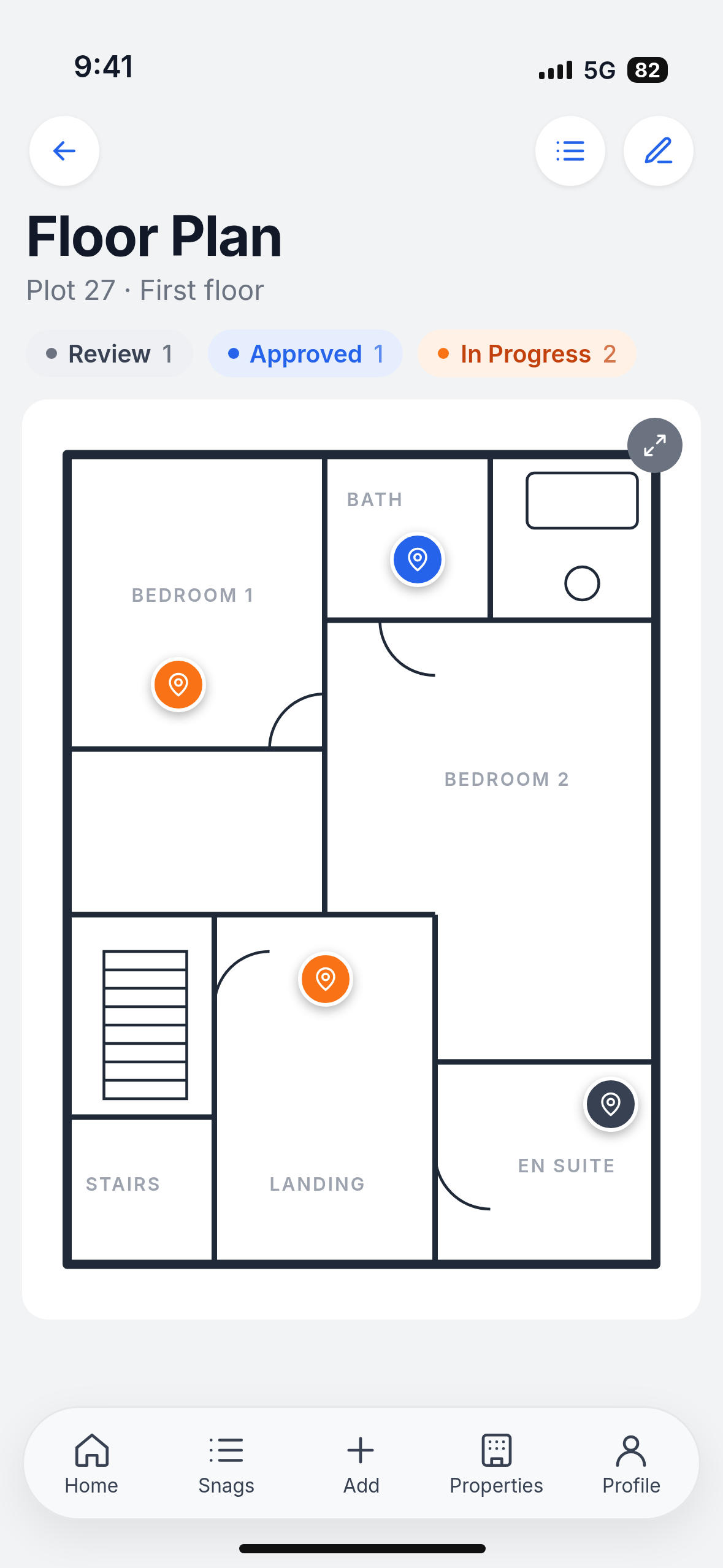
Floor plan with colour-coded pins marking each snag
Related guides
- Upgrade a propertyChoose a plan when you add a property, or upgrade a Free property later from the Properties list.
- Log a snag with photos or videoAdd a snag with photos, a title, the room, a category and a status.
- What’s in an Affixr reportA clear summary of the property, every snag, photos and, on Premium, the floor plan.
Still need help? Contact us
Questions about the app, a purchase or a feature? Email us and we will get back to you.
We aim to reply within a couple of working days.