

Assigning & statuses
Understand snag statuses
Status is how you and your builder can see what is still outstanding. In Affixr the statuses we use in reports and on the website are Review, In Progress and Completed.
- 1
Open the snag
Tap a snag in the list or on the property to see its details, photos and floor-plan location. From here you can update the status.
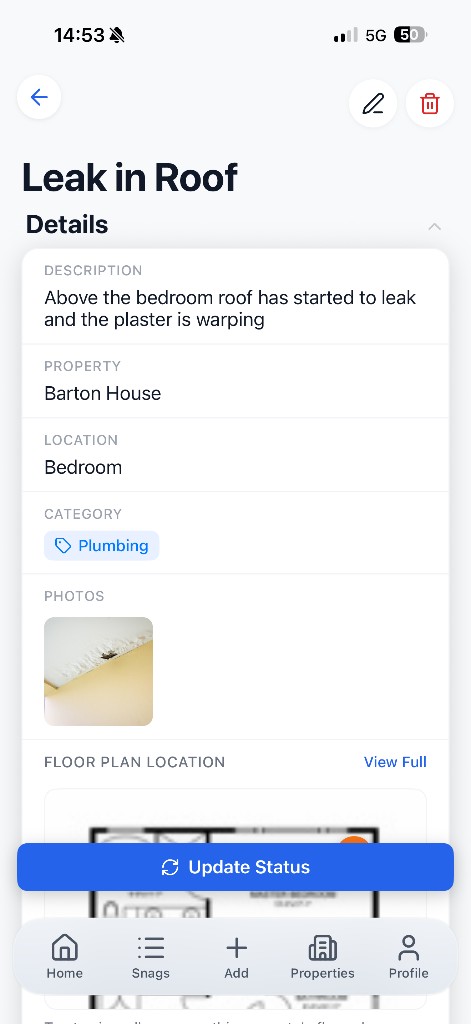
Snag detail screen with an Update Status button - 2
Tap Update Status
Choose the new status, then add an optional title and note — for example to record that a contractor is booked. Tap Update to save.
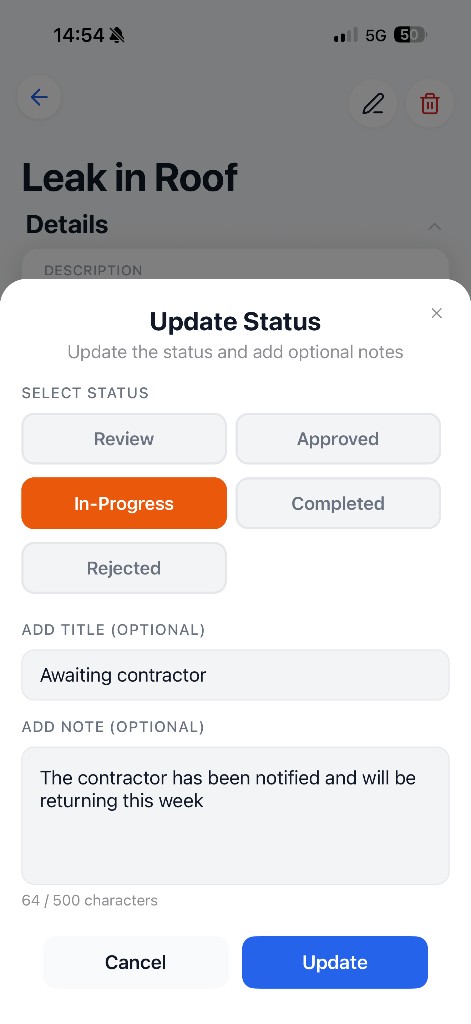
Update Status screen, with a status choice and optional title and note - 3
Keep the list current
Use Review when a snag has been logged and is waiting to be looked at, In Progress when work has started, and Completed when it is finished.
Related guides
- Assign snags to tradesOn Premium, load your contractors once, then assign a snag in a tap.
- Organise snags by room, category and statusKeep every defect easy to find, whether you are walking a room or reviewing the full list.
- What’s in an Affixr reportA clear summary of the property, every snag, photos and, on Premium, the floor plan.
Still need help? Contact us
Questions about the app, a purchase or a feature? Email us and we will get back to you.
We aim to reply within a couple of working days.